Add New Client
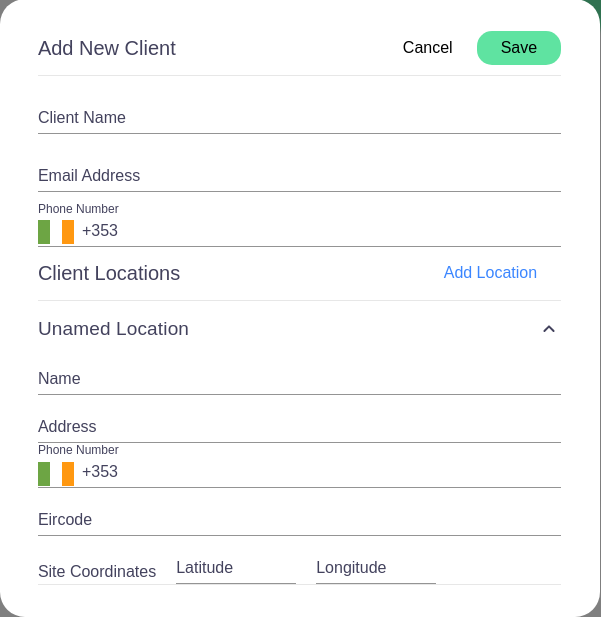
This form is used to add a new client into the system. It contains several fields that must be filled out with the client's information.
Fields Overview
- Client Name: This is a text input where the name of the client should be entered.
- Email Address: A text field for entering the client's email address. It is essential for electronic communication.
- Phone Number: A field prefixed with a country code (in this case, +353 for Ireland) where you can enter the client's telephone number.
Client Locations
- Add Location: This button, when clicked, allows the user to add various operational locations for the client.
- Unnamed Location: This is a collapsible section that can be expanded to reveal more fields related to the client's location.
- Name: A text field for the name of the location.
- Address: A field for the physical address of the client's location.
- Phone Number: Another phone number field specific to this location.
- Eircode: The unique postcode for the client's location in Ireland.
- Site Coordinates: Two fields to input the latitude and longitude coordinates for geolocation purposes.
Form Actions
- Cancel: A button to cancel the process of adding a new client.
- Save: A green button to save the new client's details into the system.