Overview
The User Management interface of the Smarter Energy Controls web application is a comprehensive dashboard for administrators to manage user accounts effectively.
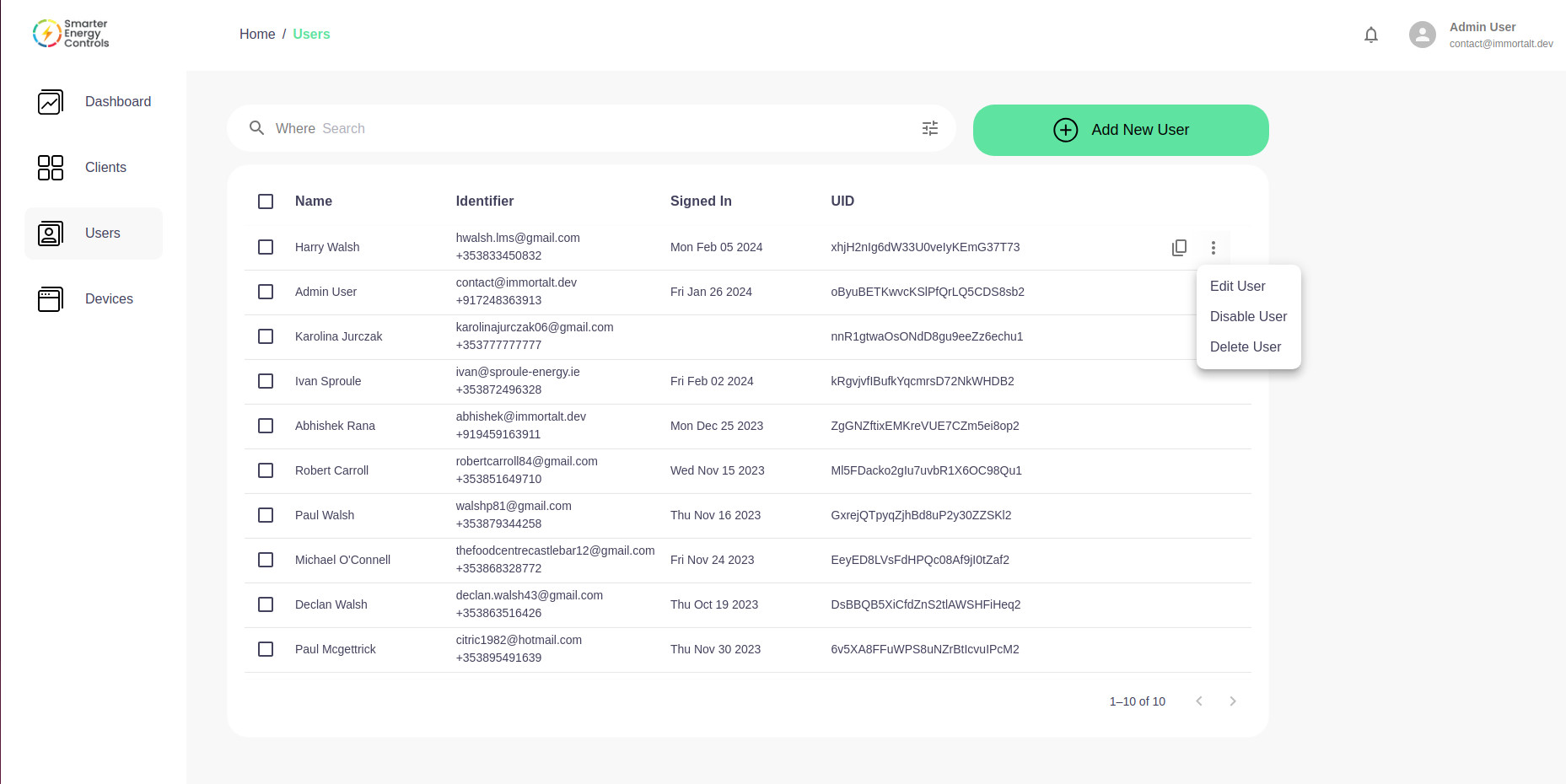
User List
The central area of the User Management page displays a list of users with the following columns:
- Checkbox: Select individual users for bulk actions.
- Name: The full name of the user.
- Identifier: Contact details, usually an email or phone number.
- Signed In: The last login date, indicating recent activity.
- UID: The unique identifier for the user within the system.
Each user entry has a context menu (three vertical dots) on the far right, providing additional actions:
- Edit User: Modify the selected user's details.
- Disable User: Temporarily disable access for the user.
- Delete User: Permanently remove the user account from the system.
Search Functionality
- Where Search: An input field to search through user accounts based on specific criteria.
Adding Users
- Add New User Button: A prominent green button that, when clicked, initiates the process to create a new user account.
This interface ensures administrators can maintain user accounts with ease, providing all necessary tools to manage user access and details efficiently.