Add New User
The "Add New User" form is a feature of the Smarter Energy Controls web application designed for administrators to add new users to the system.
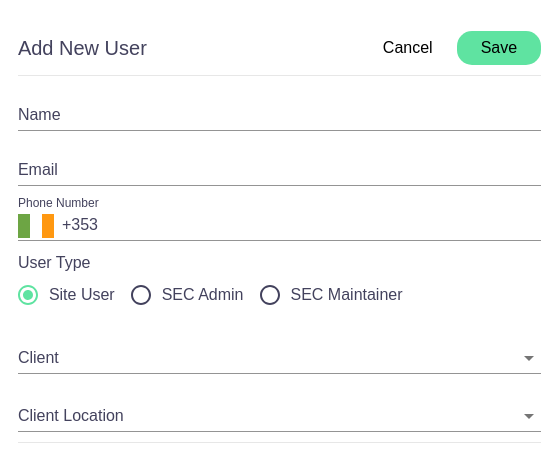
Form Fields
- Name: A text field for entering the full name of the new user.
- Email: A field for the user's email address, which will likely be used for login and communication purposes.
- Phone Number: An input for the user's telephone number, preceded by a country code (e.g., +353 for Ireland).
User Roles
- User Type: Radio buttons to select the type of user being created. Options include:
- Site User: A standard user with access to site-specific functionalities.
- SEC Admin: An administrator with broad permissions across the system.
- SEC Maintainer: A user with permissions to maintain and manage system settings at a high level.
Client Association
- Client: A dropdown menu to associate the new user with a client. This defines which client account the user will manage or have access to.
- Client Location: Another dropdown to select the specific location of the client that the user will be associated with. This is important for users managing multiple sites or locations.
Actions
- Cancel Button: Dismisses the form and cancels the process of adding a new user.
- Save Button: A green button that, once clicked, will save the new user's information and create the account in the system.
This form is a straightforward way for system administrators to onboard new users, assign them roles, and associate them with the correct client and location within the organization.